Administration
Company-wide configuration lives under Admin in the sidebar. It is only visible to administrators. If you cannot see it, your account does not have the access level for it, and an administrator has to make the change for you.
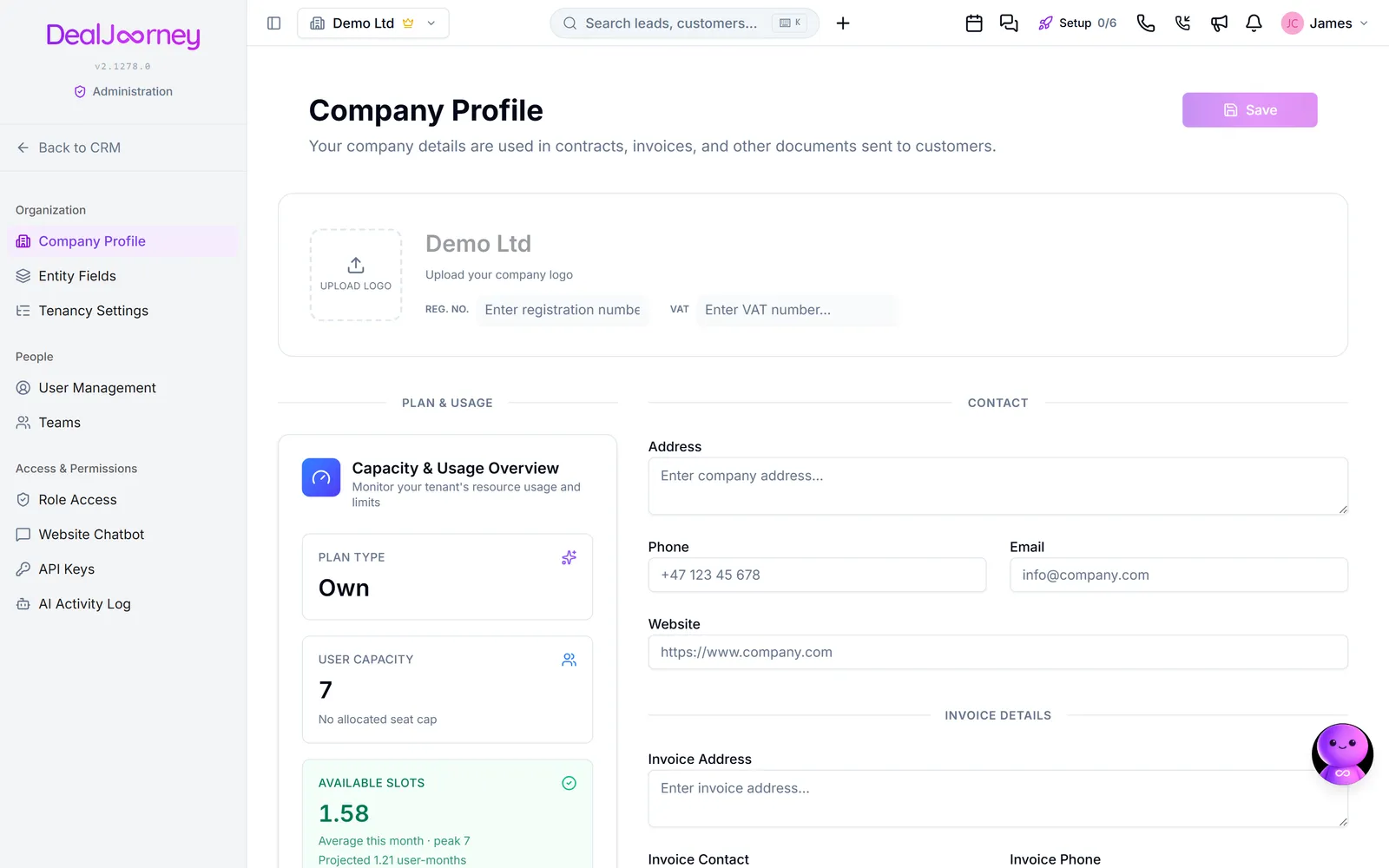
The admin area is grouped into three parts:
- Organisasjon: Firmaprofil, Fakturering, Feltoppsett, Egendefinerte objekter and Arbeidsområdeinnstillinger. This is the shape of your CRM: what a record looks like, what kinds of thing you track, and how the system behaves for everyone.
- Personer: Brukere and Team. Who has an account and how they are grouped.
- Tilgang og rettigheter: Rolletilgang, which decides what each level of user can see and do.
Two distinctions worth holding onto:
- Company settings versus your own settings. Anything under Admin affects the whole company. Your personal choices (language, notifications, how Dealy talks to you) live under Kontoinnstillinger and affect nobody else.
- Configuration versus data. Adding a field to customers is configuration and belongs here. Filling that field in on one customer is data and belongs on the record.
Changes here apply to everyone immediately, which is why the area is restricted. Removing a field or a role affects colleagues mid-work, so it is worth telling people before making structural changes.
I denne delen
Find platform administration tools
Find reports, tenant management, platform health, quiz questions and credit pricing in super admin
Test payments with Quick Pay
Compare Quickpay with the existing payment provider and verify captured payments
Publish a product update
Platform staff write a product update as an article for the website and a short in-app announcement, then release the announcement site by site
Add users and set what they can do
Invite colleagues, give them a role, and control what each of them can reach
See what a colleague does and whether they still use it
Open a person from the user list to read their details, when they were last active, and what they own
Add a custom field
Track something DealJourney has no field for, on any record type
Decide what has to be filled in before a record is created
Choose the fields everyone must complete before a customer, lead or any other record can exist
Set up your pipeline stages
Define the columns your deals move through, in the order your sales actually happen
Set your company details
Set the name, logo, address, registration and VAT numbers used on your quotes, contracts and invoices
List the software your company uses
Tell DealJourney which software your company runs on, and why it asks
Turn features on and off
Switch modules on or off for your company, and why a colleague sees a menu you do not
Set your billing details and verify your VAT number
Tell DealJourney who to invoice, and verify your VAT number so the right tax is charged
Find and download the invoices DealJourney sends you
Where your DealJourney invoices and credit notes live, and what is on them
Choose which KPIs a list page shows
Swap the KPI cards above Customers, Contacts, Leads, Opportunities, Activities, Subscriptions, Invoices and Orders for the numbers your company actually watches, and hide the row for yourself
Set up teams
Group people so lists, hours and routing can be scoped to "my team" rather than everyone
Control who can open what
Four access levels per page per role, plus your own roles when the built-in ones do not fit
Decide who can change prices and discounts on a sale
Stop a role from changing the list price or giving discounts on quote lines, while it still builds and sends quotes
Build your own sidebar menus
Rearrange and rename the items in the sidebar, and give different roles, teams or people a different menu
Rename CRM words across your workspace
Choose your own words for CRM record types once, in each language
See what an external AI assistant did
Every action taken through the AI connection, with an undo for the reversible ones
See every change across the workspace
One list of every change to a record, filterable by person, integration, record type and date
Choose what happens when you click a phone number
Point click-to-dial at your softphone, and add a country code for numbers saved without one
Your plan, seats and limits
What plan you are on, how many users it covers, and how to change it
Choose the field that identifies one of your records
Name your own customer number, P-nummer or legacy reference so imports link on it instead of creating duplicates
Vanlige spørsmål
- How do I assign someone to an empty sprint?
- How do Quickpay payments update billing?
- How do founders publish what is new?
- Why can a colleague not see something?
- When was this user last active?
- Where do custom fields appear?
- What do people have to fill in to create a customer?
- How do I change pipeline stages?
- How do I change our company name?
- Why does DealJourney ask what software we use?
- Why do I not have that feature?
- How do I add our VAT number?
- Why does the invoice say reverse charge?
- Why can I not edit the KPIs?
- What are teams for?
- A colleague cannot open a page
- Where is the setting for who can change the price of a product in a quote?
- Where can I change the names of the modules?
- Customise our workspace terminology
- What did the AI change?
- What did this person change yesterday?
- Clicking a phone number does nothing
- How many users can we have?
- How many of our customers share the same customer number?